rekordbox-bass-notes
rekordbox bass notes
Proof of concept. A local web app that reads your Rekordbox 6/7 library with
pyrekordbox, analyzes a track’s
audio for sub-bass energy, and writes a token like B:l6m9h7 into the
track’s Comment field — with a confirmation step and automatic backups.
See PLAN.md for the design and build history, and
DISTRIBUTION.md for the plan to package it as a macOS app.
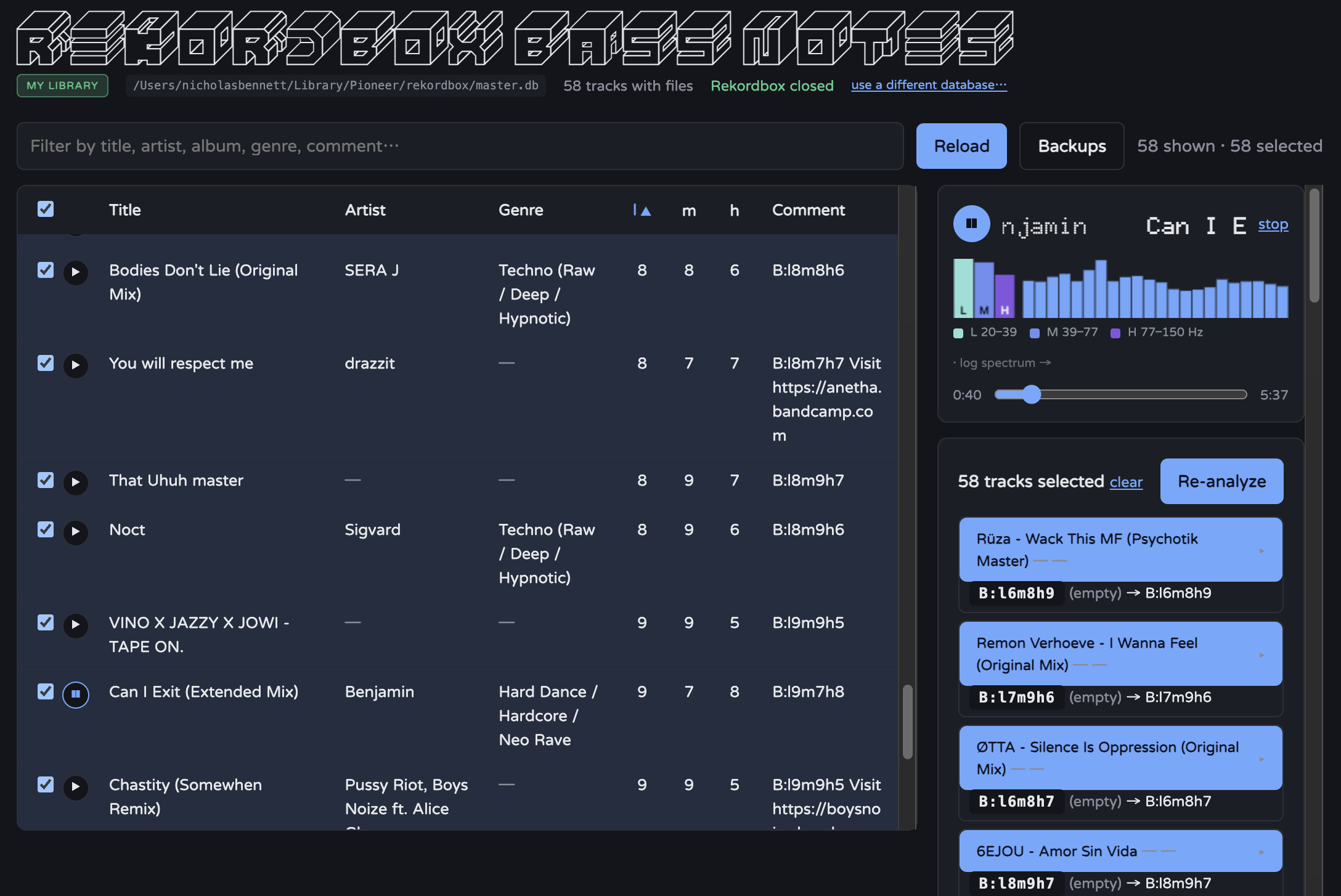
Status: working POC. Single user, local only, no auth. Analysis writes the
Commntfield; the optional artist-review workflow writes Artist and Title. Each save is an atomic transaction with an automatic backup.pyrekordboxwrite support is officially “experimental” — hence the backups and restore. Verified through the API and a production build; most of the UI hasn’t been rendered/clicked-through in a browser here (no browser in the dev environment).
What the token means
B : l6 m9 h7
│    │  │  │
│    │  │  └─ High  band digit
│    │  └──── Medium band digit
│    └─────── Low   band digit
└──────────── preset prefix (fixed)
| Part | Meaning |
|---|---|
B: |
Preset prefix. Identifies the analysis configuration. Bump to C: if you ever recalibrate so old and new tokens stay distinguishable. |
l / m / h |
Low / Medium / High sub-bands of 20–150 Hz, log-spaced: 20–39 / 39–77 / 77–150 Hz. Lowercased so the digits stand out. |
digit 0–9 |
Strength in that band on a fixed, absolute dBFS scale (0 dBFS = full-scale sine). Per band, d means the band’s whole-track RMS landed in decile d of a calibrated window: L −46→−18, M −23→−7, H −20→−9 dBFS. Absolute ⇒ a token is comparable against any track, now or later. |
The token is prepended to the comment; any existing B:l#m#h# token (either
letter case) is stripped first, then the new one goes at the front.
Caveats: analysis uses the raw file level — Rekordbox’s track gain is not applied, so two masters of the same track at different loudness score differently. The M band tends to sit at 7–9 for club music because 39–77 Hz is near-maxed in modern masters; that’s the real distribution, not a bug.
Requirements
- macOS (paths below assume it)
- Python 3.11 (repo ships a
.venv) - Node 22+
- Rekordbox fully quit whenever the app writes
Audio decoding is soundfile / libsndfile — WAV, AIFF, FLAC, MP3, OGG —
with a bundled ffmpeg (via imageio-ffmpeg) picking up M4A / AAC / ALAC /
MP4 / WMA.
Setup
# backend (the .venv already exists in this repo)
.venv/bin/pip install -r backend/requirements.txt

# frontend
cd frontend && npm install
Run (development)
# terminal 1 — API on :8000
.venv/bin/uvicorn backend.main:app --reload --port 8000

# terminal 2 — Vite dev server on :5173 (proxies /api → :8000)
cd frontend && npm run dev
Open http://localhost:5173.
To build the double-clickable macOS app (Apple Silicon):
scripts/build_app.sh          # → dist/rekordbox bass notes.app + a .dmg
scripts/build_app.sh --no-dmg # just the .app
See DISTRIBUTION.md for the full packaging plan and status.
- The list shows only tracks with a local audio file (streaming and
missing/relocated files are hidden). Check rows (or click them) to select;
the header checkbox selects everything shown. The ▶ button in each row
plays that track through the always-visible player at the top of the right
column (play/pause, seek bar, a Web Audio spectrum analyzer: a log-frequency
bar chart whose first three bars are the L / M / H sub-bass bands —
20–39 / 39–77 / 77–150 Hz, matching the analysis token — each letter-labelled
and in a cool cyan→violet palette that stays distinct in greyscale). The l / m / h
columns show the digits from the existing
B:l#m#h#token, or an analysis preview as it arrives (blank if neither exists). Click any column header to sort by it — first click ascending, second descending, third clears; tracks with no token sort to the bottom of the l/m/h sorts. - One or more tracks selected → Analyze → a per-track result list and
proposed
B:l#m#h#comment values. When the batch completes, the app offers to save the changed comments to Rekordbox in one transaction and then clears the completed results. - Save is disabled while Rekordbox is running — a banner appears, and the app re-checks every 5 s (or on the banner’s button), so quitting Rekordbox mid-session re-enables it without a reload.
- Backups (toolbar) lists every backup with what’s inside it and a one-click restore (guarded, snapshots the current library first).
- Infer missing artists (toolbar) shows tracks with an empty Artist whose
Title has the form
Artist - Title. Select candidates, then review a small Old / New table for both Artist and Title before saving. Existing Rekordbox artist records are reused; new artist records are created when needed. All selected Artist/Title changes are saved in one backed-up transaction.
It opens your real Rekordbox library (auto-located) by default. The header
shows which database is active (MY LIBRARY / CUSTOM DATABASE), or a
locate screen if none is found; use a different database… points at another
master.db. Quit Rekordbox before saving.
Rebuild the app
To rebuild the complete Apple Silicon macOS application after changing either the frontend or backend, run this from the repository root:
./scripts/build_app.sh
The script rebuilds frontend/dist, packages the frontend and Python backend
into dist/rekordbox bass notes.app, ad-hoc signs it for local use, and creates
a DMG alongside it. To create only the .app:
./scripts/build_app.sh --no-dmg
The build requires the repository .venv to contain the pinned backend
dependencies plus PyInstaller, and runs on Apple Silicon. The output is
ad-hoc signed; it is not notarized for distribution.
Configuration
Two user-settable values — which master.db and where backups go — persist
to config.json (dev: ./.rkbx-config.json, gitignored). Precedence: environment
variable → config.json → default. Everything else is env-only; defaults live in
backend/config.py.
| Variable | Default | Purpose |
|---|---|---|
REKORDBOX_DB_PATH |
(auto-locate) | Path to a specific master.db (file or its dir). Unset ⇒ pyrekordbox finds your Rekordbox library. Overrides config.json. |
USE_LIVE_LIBRARY |
(unset) | 1 / true — ignore any saved/REKORDBOX_DB_PATH value and force auto-locate. |
BACKUP_DIR |
backend/backups/ |
Where write backups go. |
BACKUP_KEEP |
20 |
Max backup sets kept; older ones pruned after each write. 0 = keep all. |
RESULT_LIMIT |
4000 |
Max tracks returned by /api/tracks. |
FRONTEND_ORIGIN |
http://localhost:5173 |
CORS allow-origin. |
UPDATE_REPO |
(unset) | owner/repo for the in-app update check. Unset ⇒ no update banner. |
UPDATE_GITHUB_TOKEN |
(unset) | Fine-grained PAT (read-only Contents/Releases) for UPDATE_REPO when it’s private. |
AUDIO_SR |
500 |
Hz the audio is resampled to for the DSP (only 20–150 Hz matters). |
FILTER_ORDER |
8 |
Butterworth band-pass order. |
PRESET_LETTER |
B |
Token prefix. |
COMMENT_SEP |
" " |
Separator between the token and the rest of the comment. |
DBFS_MIN_L / DBFS_MAX_L |
-46 / -18 |
Low-band digit window (dBFS). |
DBFS_MIN_M / DBFS_MAX_M |
-23 / -7 |
Medium-band digit window. |
DBFS_MIN_H / DBFS_MAX_H |
-20 / -9 |
High-band digit window. |
The per-band dBFS windows above are the frozen, calibrated values (from a sample of ~117 local tracks; see
backend/calibrate.py). Changing them makes new tokens inconsistent with ones already written — if you must, also bumpPRESET_LETTER.
Database safety
- Backup before every write.
master.db+-wal+-shmare copied tobackend/backups/master_<timestamp>.dbbefore the row is modified. A failed copy aborts the write. - Post-write
PRAGMA quick_check. A non-okresult raises an error that names the backup to restore. No automatic restore. - Retention. Only the newest
BACKUP_KEEPsets are kept. - Guards. The write is refused while Rekordbox is running (an up-front
psutilcheck andpyrekordbox’s own check insidecommit()); the commit is atomic and rolls back on failure. - Not covered: backups are same-disk only; there’s no cross-process lock; and
Rekordbox cloud/library sync can modify
master.dbon its own — pause it while using this.
Restore
python -m backend.restore
Lists every backup newest-first with, for each: the time it was taken, file
sizes, and — read from inside the file — the agentRegistry USN, track count,
how many tracks carry a B:l#m#h# token, and the 3 most recently edited titles.
The live database’s stats are shown at the top for comparison.
python -m backend.restore 2          # restore backup #2 from the list
python -m backend.restore prerestore # match by name substring
python -m backend.restore 2 --yes    # skip the confirmation prompt
Restoring first snapshots the current live DB to *_prerestore.db (so it’s
reversible), then copies the chosen backup over master.db and clears the live
-wal/-shm. Run it with the backend server stopped and Rekordbox closed.
First real write
The app already points at your Rekordbox library. Before the first save:
- Quit Rekordbox completely. Pause Rekordbox cloud/library sync if you use it.
- Check the header — badge says MY LIBRARY and the path is your
~/Library/Pioneer/rekordbox*/master.db. (python -m backend.inspect_dbprints the same.) - Analyze and save one track. Reopen Rekordbox and check its Comment.
- If anything looks off:
python -m backend.restore(or the restore endpoint).
To work against a copy instead, use use a different database… in the header
(or REKORDBOX_DB_PATH=/path/to/copy/master.db).
Command-line tools
Run these with the venv’s interpreter: .venv/bin/python -m backend.<tool>.
| Command | Purpose |
|---|---|
python -m backend.analysis <file-or-trackID> [--json] [--comment TEXT] |
Analyze a track outside the web app; --comment previews the merge. |
python -m backend.calibrate [--limit N] |
Batch every local track → per-band dBFS distribution report; use it to re-tune the DBFS_* windows. Writes calibration.json. |
python -m backend.inspect_db [path] |
Sanity-check a master.db copy: does it open, how many tracks, how many with local files. |
python -m backend.restore [<index-or-name>] [--yes] |
List / restore backups (see above). |
HTTP API
| Method | Path | Notes |
|---|---|---|
GET |
/api/health |
{ version, db_path, db_kind (live|custom|none), detected_library_path, rekordbox_running, rekordbox_agent_running, log_path, … } — the UI polls this every 5 s |
GET |
/api/tracks?search=&limit= |
Local-file tracks only |
GET |
/api/tracks/{id} |
Any track, including streaming |
GET |
/api/tracks/{id}/audio |
Streams the local audio file (Range/seek supported) for the player |
POST |
/api/tracks/{id}/analyze |
Analyze one track + proposed comment. No write. 404 / 422 (no local file) / 500 |
POST |
/api/tracks/analyze |
Body {"ids": [...]}. Analyze many; response is an NDJSON stream, one line per track as it finishes. No write. |
PUT |
/api/tracks/{id}/comment |
Body {"token": "..."} (merge/prepend) or {"comment": "..."} (replace). 409 if Rekordbox is running |
PUT |
/api/tracks/comments |
Body {"items": [{"id", "token"\|"comment"}]}. Writes all in one transaction with one backup. Any unknown id rejects the whole batch (nothing written); duplicate ids → 422 |
PUT |
/api/tracks/metadata |
Body {"items": [{"id", "artist", "title"}]}. Atomically updates Artist and Title with one backup, reusing or creating the required Rekordbox artist records. |
POST |
/api/db/switch |
Body {"target": "live"} (auto-locate) or {"target": "custom", "path": "/…/master.db"}. Reopens the backend against that database and persists the choice to config.json. Returns fresh health. |
GET |
/api/backups |
The backup listing (name, time, sizes, USN, track/tagged counts, recent edits) + the live DB’s stats. |
POST |
/api/backups/{name}/restore |
Restore that backup over the live DB. Rekordbox must be closed (409 otherwise); snapshots the current DB to *_prerestore.db first. Returns fresh health. |
GET |
/api/diagnostics |
Plain-text tail of the app log, useful when investigating a backend error. |
GET |
/api/update-check |
Latest GitHub release vs. the running version (UPDATE_REPO); supported:false when unset. Memoised ~1 h. |
POST |
/api/update-check/dismiss |
Body {"version"}. Persists last_seen_version so the update banner stays hidden for it. |
POST |
/api/open-external |
Body {"url"} (http/https). Opens it in the user’s real browser. |
POST |
/api/pick-file |
Opens the OS file dialog (packaged app only; 501 in dev/browser). Returns {path} or {path:null} on cancel. |
Layout
launcher.py       frozen-app entry point: uvicorn thread + pywebview window
                  + single-instance lock + graceful shutdown
rekordbox bass notes.spec   PyInstaller spec (arm64 .app)
scripts/          build_app.sh (→ .app/.dmg), make_icns.sh
packaging/        icon-src.svg + icon.icns
backend/
  config.py       static/env settings (audio, dbfs_scale, …)
  runtime.py      user-settable, persisted: db_path + backup_dir
                  + last_seen_version (config.json)
  db.py           pyrekordbox wrapper: reads, backup(), set_comment(s)()
  analysis.py     decode (soundfile, ffmpeg fallback) → band-pass → dBFS
                  → token → merge (+ CLI)
  calibrate.py    batch dBFS distribution report (CLI)
  restore.py      list / restore backups (CLI + shared with the API)
  inspect_db.py   sanity-check a master.db (CLI)
  logging_setup.py  rotating app.log (~/Library/Logs/… frozen, ./.logs/ dev)
  update_check.py   GitHub Releases vs __version__
  desktop.py        native file-picker bridge (set by launcher.py)
  main.py         FastAPI app
  backups/        auto-written backups (gitignored)
  tests/          unittest (e.g. process-detection regression)
frontend/src/
  App.tsx, api.ts, types.ts
  bassToken.ts       l/m/h band edges + parse digits out of a "B:l#m#h#" token
  analysisCache.tsx  results kept per track id for the current library
  player.tsx         one <audio> + Web Audio AnalyserNode (Context)
  hooks/          useHealth (5 s poll), useTracks, useBackups, useUpdateCheck,
                  useAnalyze(+Batch), useUpdateComment(+Batch)
  components/     TrackTable, PlayerPanel, AnalyzePanel, BatchPanel,
                  AnalysisDetail, CommentDiff, ConfirmDialog,
                  BatchConfirmDialog, DbSwitcher, NoLibrary, BrowseButton,
                  RekordboxBanner, RestorePanel, UpdateBanner, CopyDiagnostics
frontend/public/fonts/Cube.ttf   display face for the "rekordbox bass notes" title
config.json       chosen db_path + backup_dir + last_seen_version
                  (dev: .rkbx-config.json, gitignored)